Automated Testing: Your Criteria Are Already Tests
The Two-Week Cliff
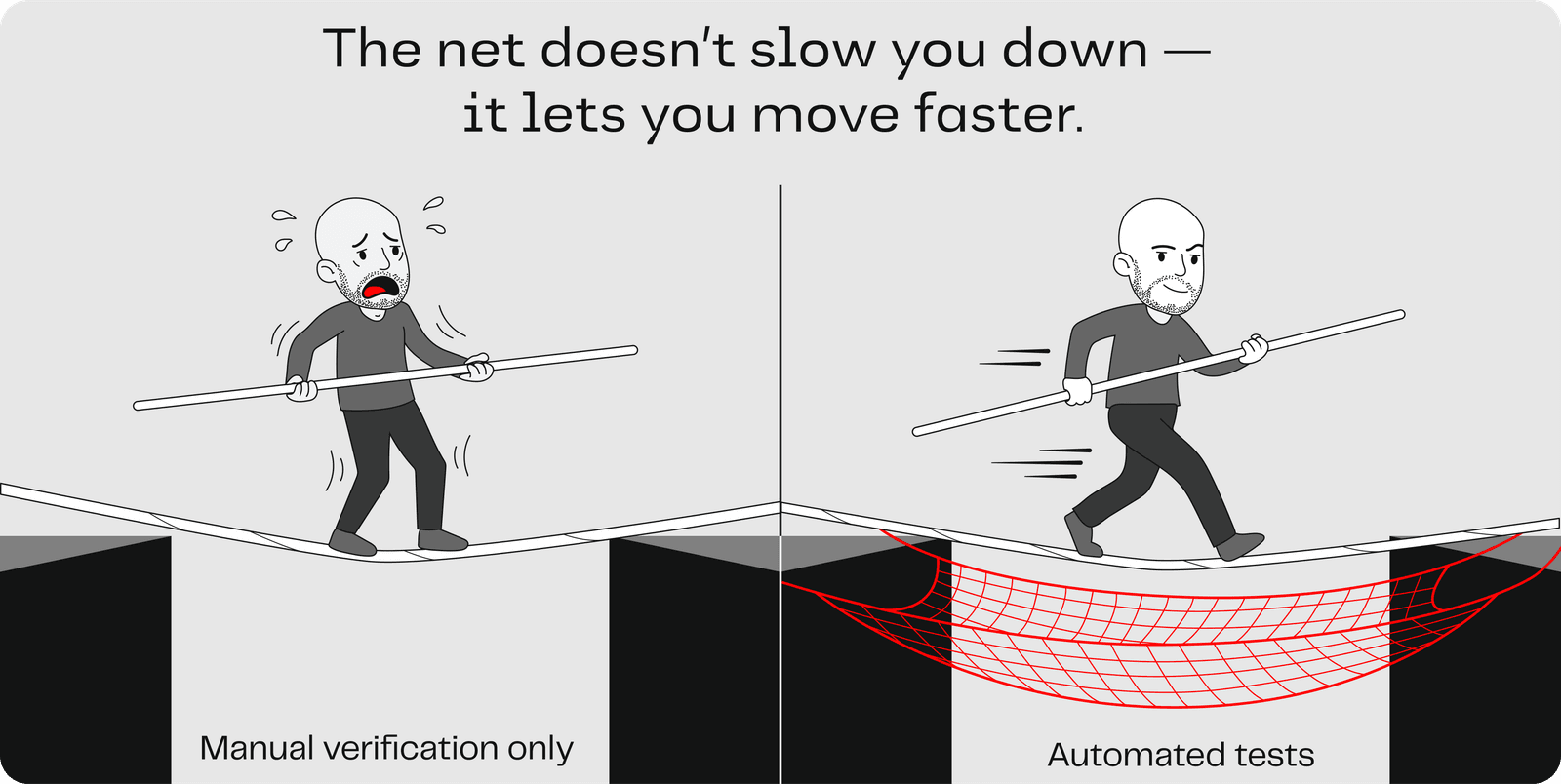
Here is what happens when manual verification is your only safety net:
Week 1: You build a feature. It works. You verify it manually, walking through your acceptance criteria one by one. All pass.
Week 2: You add a second feature. It works too. You verify the new feature. All criteria pass.
The cliff: A user reports that the first feature is broken. The second feature touched shared code, and you only verified the new one. No automated checks warned you that the first feature broke.
This is the two-week cliff: rapid progress followed by a collapse when changes silently break things that used to work. The pattern is consistent: AI can build features fast, but without automated checks, one change can undo a week of verified work.
Manual verification is a point-in-time check. It tells you "this worked when I looked at it." It does not tell you "this still works after the last three changes." That gap between what you checked and what is still true is the validation gap, and it grows with every change you make.
The Insight You Already Have
Here is the good news: you already know how to write test specifications. You have been writing them since you learned the Given/When/Then format.
Look at a typical acceptance criterion:
Given I am on the search page,
When I type a name and click Search,
Then the results display matching entries with their key details.
Now look at how an automated test works:
- Given (setup): Navigate to the search page
- When (action): Type a name and click Search
- Then (check): Verify that matching entries appear with their key details
Same structure. Same logic. Same words. Your acceptance criteria in Given/When/Then format are test specifications. They just need to be translated into code. And that is exactly what your AI coding assistant can do.
| Manual Review | Automated Tests | |
|---|---|---|
| Who checks | You, walking through each criterion | Code that runs automatically |
| When it checks | When you remember to | Every time anything changes |
| What it catches | What you look at right now | Regressions across the entire project |
| How it scales | It does not: more features = more manual work | It does: more tests = more coverage, same effort to run |
You are not replacing your judgment. You are extending it. You still write the acceptance criteria. You still decide what "done" means. But instead of being the only one who can verify, you teach the machine to verify for you.
The Closed Loop
Here is the pattern that makes automated testing work:
- Write acceptance criteria: you already know how (Given/When/Then)
- Ask AI to generate tests: hand your criteria to your AI coding assistant
- Run the tests; they fail: the feature does not exist yet, so the tests correctly report failure
- Ask AI to implement the feature: now AI builds, guided by the tests and your criteria
- Run the tests; they pass: the feature works, verified automatically
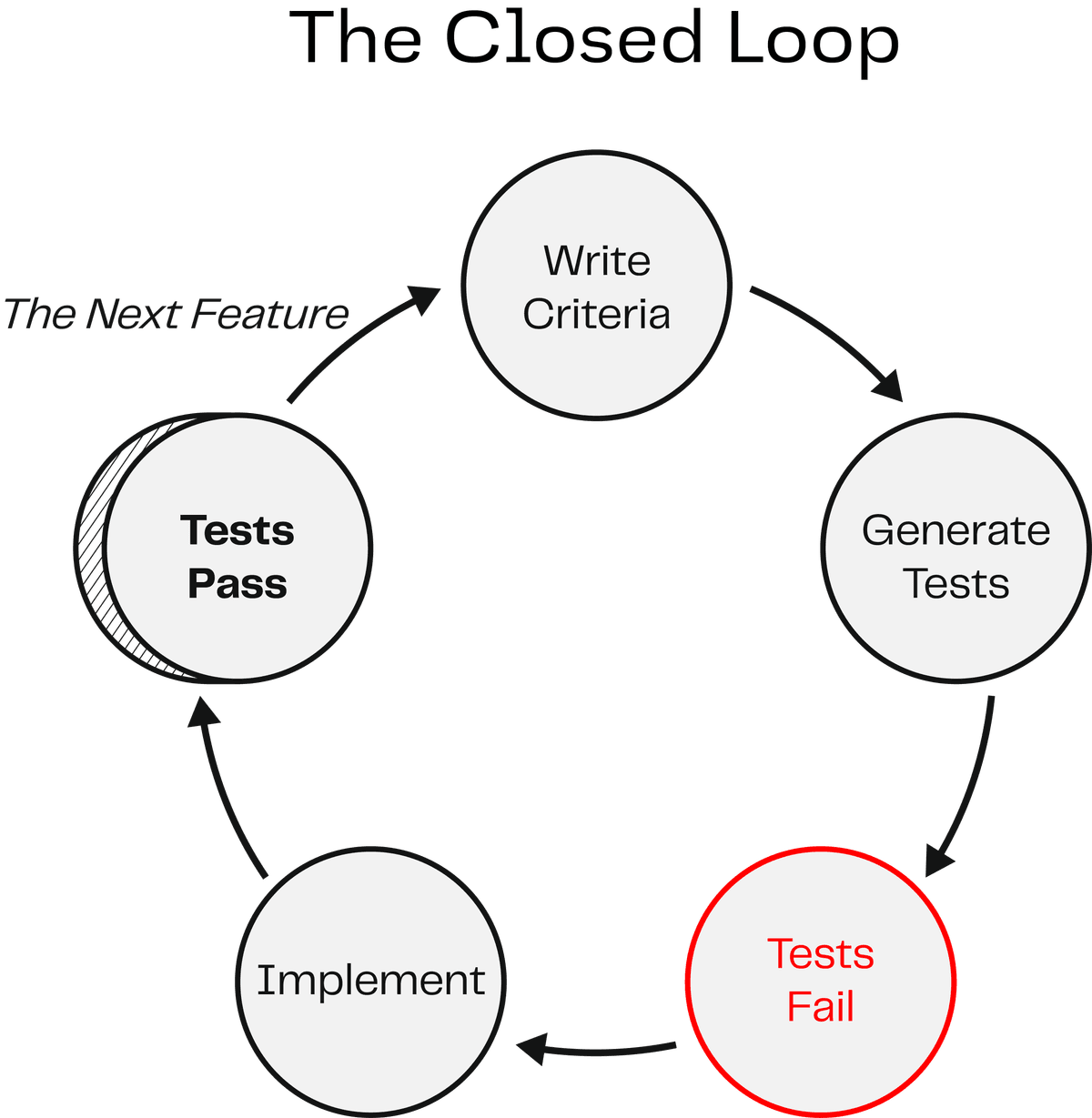
This is the closed loop: criteria drive tests, tests drive implementation, implementation satisfies criteria. The loop closes because the same acceptance criteria that defined "done" also verify "done."
If this pattern sounds familiar to any engineers on your team, it should. This is test-driven development (TDD), one of the most respected practices in software engineering. The classic rhythm: write the test first, watch it fail (red), write the code to make it pass (green), then clean up. Engineers have practiced this for decades.
What has changed is who does what. In traditional TDD, the developer writes the test AND the code. In your workflow, you write the acceptance criteria, AI writes the test, and AI writes the implementation. The discipline is the same: define success before you build. The difference is that AI handles the translation from criteria to code on both sides.
Once those tests exist, they run every time. Build a new feature next week? Your existing tests still run. Refactor shared code? Tests catch anything that breaks. That is the difference between a point-in-time check and a permanent safety net.
Generating Tests from Your Criteria
The pattern is straightforward. Take an acceptance criterion you have already written and ask your AI coding assistant:
Generate an automated test for this acceptance criterion:

Given [your setup condition],
When [the user action],
Then [what should happen].

Follow the testing patterns already in the project.
AI generates the test code. You do not need to understand every line of it. You need to verify that the test matches your intent. Ask:
Explain this test in plain English.
What does it check? What would make it fail?
If the explanation matches your acceptance criterion, the test is doing its job. If it does not, push back, just like you would push back on any delegate who misunderstood the contract.
Takeaway
The quality of your tests depends on the quality of your criteria. Vague acceptance criteria produce vague tests. Specific criteria produce specific tests. Everything you practiced in the beginner track (the Three Pillars, the Given/When/Then format, tight acceptance criteria) directly determines how good your automated tests are. The skill compounds.
Try It
Pick one acceptance criterion from your project, something you verified manually, and try the pattern:
- Ask your AI coding assistant to generate a test from the criterion
- Ask it to explain the test in plain English
- Run the test
- If the test passes, you have an automated check for that feature. If it fails, you have found something to fix.
Once you have one test working, do not stop there. Think about your application as a whole:
- What are the riskiest parts of your application, the features where a bug would matter most?
- What is hardest to verify manually? What do you skip checking because it takes too long?
- What has broken before when you added something new?
Each of those is a candidate for an automated test. Your goal is not one test. It is a test suite: a collection of tests that covers the critical paths through your application. Ask your AI coding assistant to help you identify what to test next: "What are the most important features in this project that do not have automated tests yet? Help me write tests for the riskiest ones first."
A Note on When to Start
This curriculum introduced automated testing after you had already built a working application. That was intentional: this training is designed to ease you into software development concepts one at a time rather than giving you everything at once.
In practice, on a real project, you would not wait until the end to add tests. You would write them from the beginning, for every feature, as you build. That is what the closed loop is really about: criteria first, then tests, then implementation. When testing is part of how you build from day one, you never accumulate a backlog of untested code that you have to go back and cover after the fact.
If you are starting a new project after this, add this to your project context file so AI follows the pattern automatically:
When implementing a user story, always write a failing test from the
acceptance criteria first, then implement until the test passes, then
run the full test suite to check for regressions.
That one instruction turns the closed loop into your default workflow from the start.
Key Insight
The closed loop (criteria, tests, fail, implement, pass) turns your acceptance criteria into a permanent safety net. Tests do not just verify once; they verify every time. AI generates the test code from criteria you already wrote. You do not need to understand test code. You need to verify that the test matches your intent. Together, automated tests replace "I checked it manually" with "tests check it automatically, every time."